

About Controls
This article explains the basics of controls and how they work in Eon.
A backup posture control (also called control) is a set of conditions and rules that are used to keep your snapshots compliant with legal regulations, industry standards, and your company’s policies. Think of controls as a set of catch-all requirements your backup policies need to meet.
Eon compares controls with backup policies and resource classifications to evaluate your backup posture. If your resources are being backed up according to the applicable controls, you have a good backup posture. On the other hand, if your resources aren’t being backed up according to the applicable controls, Eon reports it as a violation, and your backup posture is considered compromised.
Parts of a control
The component parts of a control are conditions, rules, and severity.
Conditions
Conditions are the logic that determines which resources the control applies to. You can set conditions against some resource properties, including region, cloud account ID, environment, and data classes.
A condition is made up of a property, an operator, and a value, as shown in this image:
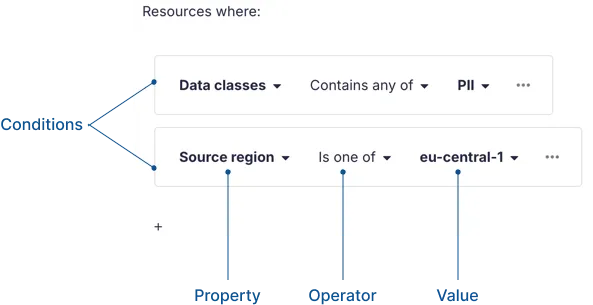
Unlike backup policy conditions, control conditions always use AND logic, and they can’t be grouped. Only resources that meet all of a control’s conditions are covered by that control.
Rules
Rules are the requirements the resources must meet. You can set rules requiring backing up to a different region or account from the source, or minimum or maximum retention, among others.
All rules in a control must be met for the control to pass.
Severity
Severity is how important a control is to your company. Severity is relevant when a control violation is reported. We’ll look at severity in more detail when we cover control violations, next.
Control violations
A control violation is an instance where a resource’s applied backup policies don’t meet the requirements of a control. When a violation is reported, it means your backup posture is compromised.
When violations are found, you’re immediately notified according to your notification settings. You can also view violations in the dashboard and inventory. A violation is given the severity according to what you set in the relevant control.
Violations are found and reported only on resources that haven’t been excluded from backup.
Policies and classification are used to determine control violations
So what exactly does Eon look at to report control violations? The short answer is that these things are taken into account:
-
Resource metadata from discovery. This includes the resource’s region, cloud account ID, cloud provider, and tags.
-
Resource classification data. This includes the resource’s environment, data classes, and installed apps.
-
Rules from the backup policies that apply to the resource. This includes frequency and retention, as well as vault region and cloud provider settings.