

Manage Controls
Who can use this feature
Anyone with these permissions: Manage controls
This article explains how to create and manage your project’s controls.
Create a control
To get started, in the Controls page, click Add New Control. The Create Control page is opened.
Name the control

Provide a name for the control.
A good control name describes the control’s purpose.
For example, if you want the control to enforce a maximum retention of 180 days for PII in an EU region, you could give the name EU PII has 180-day max retention.
Click Continue.
Set conditions
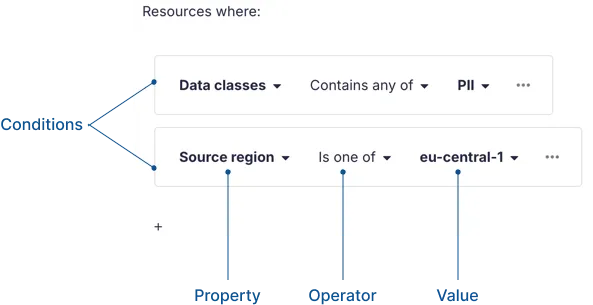
Add the conditions that meet your needs. All controls use a single-layered list of conditions with AND logic. In other words, the control applies to resources where all of the conditions are met.
For more information on conditions, see Conditions in About Controls.
-
To add a condition: Click (Add condition), then select the property, operator, and value for the condition.
-
To delete a condition: Click the condition’s (Actions) menu, then click Delete condition.
Set rules
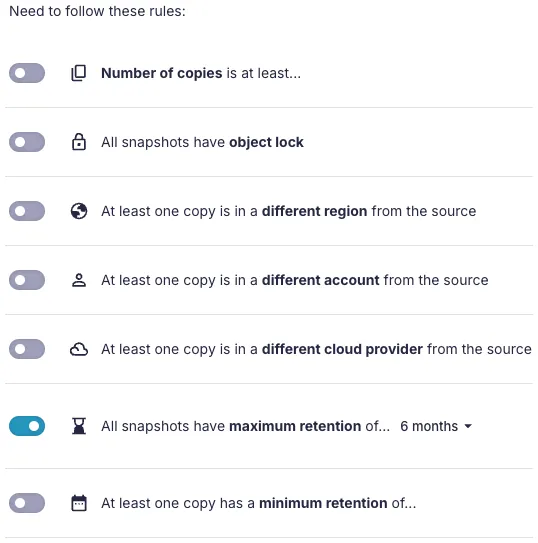
Under Need to follow these rules, enable the rules you want the control to enforce.
All enabled rules are required for the control to pass. If a single rule is violated, a control violation will be reported.
-
Number of copies is at least: Sets the minimum number of copies that must exist for the control to pass.
-
At least one copy is in a different region from the source: Requires at least one copy to be in a vault in a different region from the source, regardless of cloud provider or account. If the source and vault are in the same region on different cloud providers or different accounts, it counts as a violation.
-
At least one copy is in a different account from the source: Requires at least one copy to be in a vault in a different account from the source, regardless of cloud provider or region. If the source and vault are in the same account on different cloud providers or regions, it counts as a violation.
-
At least one copy is in a different cloud provider from the source: Requires at least one copy to be in a vault in a different cloud provider from the source, regardless of account or region. If the source and vault are in the same cloud provider but different accounts or regions, it counts as a violation.
-
All snapshots have maximum retention of…: Requires all applicable backup policies to have a maximum retention period.
-
At least one copy has a minimum retention of…: Requires at least one applicable backup policy to have a minimum retention period.
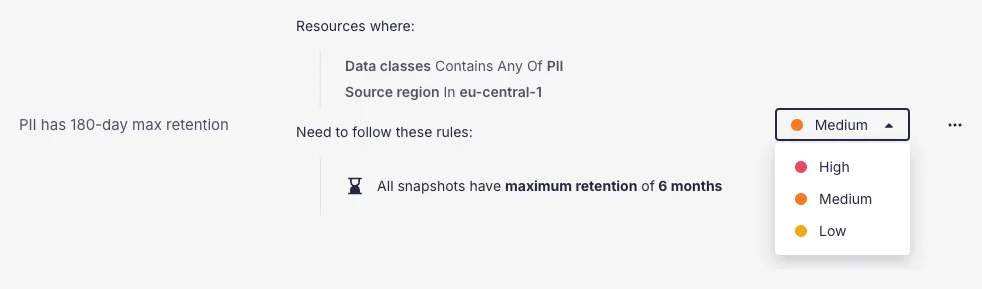
Your control is active, and Eon reports all violations.