

About Ransomware Detection
Available for Amazon EC2, Amazon RDS, Amazon S3, Azure Database for PostgreSQL flexible server, Azure Storage Accounts, Azure Virtual Machines, SQL Server on Azure VMs, Google Cloud SQL, and Google Compute Engine.
Eon ransomware detection allows you to monitor your snapshots for signs of ransomware. This allows you to quickly recognize attacks and recover data from a confirmed clean state, from individual files to complete resources.
How Eon protects against ransomware
Ransomware is a type of malware where bad actors gain access to a system, encrypt data, and demand a ransom in exchange for the decryption key. Aside from internal and production systems, ransomware can also target data backups, which can lead to significant downtime and data loss. It’s one of the most widespread and financially damaging threats, with attacks increasing in frequency and sophistication.
Out of the box, Eon’s snapshots are stored in isolated vaults outside of your internal and production environments. This ensures that even if attackers gain access to your systems, they can’t delete your backup data.
In addition to this layer of protection, Eon also scans your snapshots for indicators of ransomware activity. Eon uses different detection methods depending on the resource type.
Eon retains a protected resource’s latest clean snapshot indefinitely, even if their retention periods expire. This ensures you always have a clean recovery point to restore from in the event of a ransomware attack.
File-based resources
For file-based resources such as VMs and object storage, Eon scans for these indicators:
-
File entropy: Eon measures whether previously unencrypted files are presently encrypted.
-
File signatures: Eon detects known ransomware indicators, including suspicious file extensions, unusual file sizes, atypical directory structures, and ransom notes.
-
Moved files: Eon detects when files are deleted and recreated with different names or encryption status. This pattern commonly occurs when ransomware encrypts files that were previously unencrypted. These are typical behaviors of ransomware campaigns that organize files before or during encryption.
Files under 1 KB aren’t included in ransomware detection. This reduces noise from false positives, as small files don’t hold enough data to calculate entropy.
Databases
For databases, Eon examines structured data elements such as tables, rows, schema definitions, and value distributions to identify indicators of ransomware activity or corruption. Rather than scanning files, Eon analyzes the data itself for these indicators:
-
Row and table count drops: Eon detects sudden, unexplained decreases in the number of rows or tables, which can indicate data deletion or destructive encryption.
-
Schema changes: Eon identifies unexpected modifications to database schemas, such as dropped or altered tables and columns.
-
Cardinality shifts: Eon monitors for unusual changes in value distributions caused by encrypted or overwritten data replacing normal values.
-
Data corruption patterns: Eon detects corruption signatures that indicate tampering or bulk data manipulation.
-
Embedded ransomware notes: Eon scans for ransom notes inserted into stored datasets, a common tactic where attackers leave demands within the data itself.
Each indicator contributes to a weighted confidence score. Eon correlates multiple signals before flagging a backup as potentially compromised, reducing false positives while maintaining detection accuracy.
Resource eligibility
Eon can detect ransomware on resources that are backed up by Eon. While Eon doesn’t require a clean baseline snapshot to detect ransomware, it works best when there is at least one clean snapshot first. This gives Eon a reliable comparison for subsequent snapshots.
Eligible resource statuses are Protected, All violations muted, Violations detected, and Action required. Resources that haven’t been backed up by Eon or have any other status are ineligible for ransomware detection.
Where to see ransomware infections
Eon provides multiple ways to monitor and handle ransomware infections. You can find ransomware reporting in your dashboard, inventory, and file explorer. You can additionally set up notifications when a resource’s ransomware infection status changes from clean to infected or infected to clean.
For guidance on responding to infections, see Handle Infected Resources.
In the dashboard
Ransomware-enabled projects contain a dashboard panel that gives you insights into your resource infection status and health.
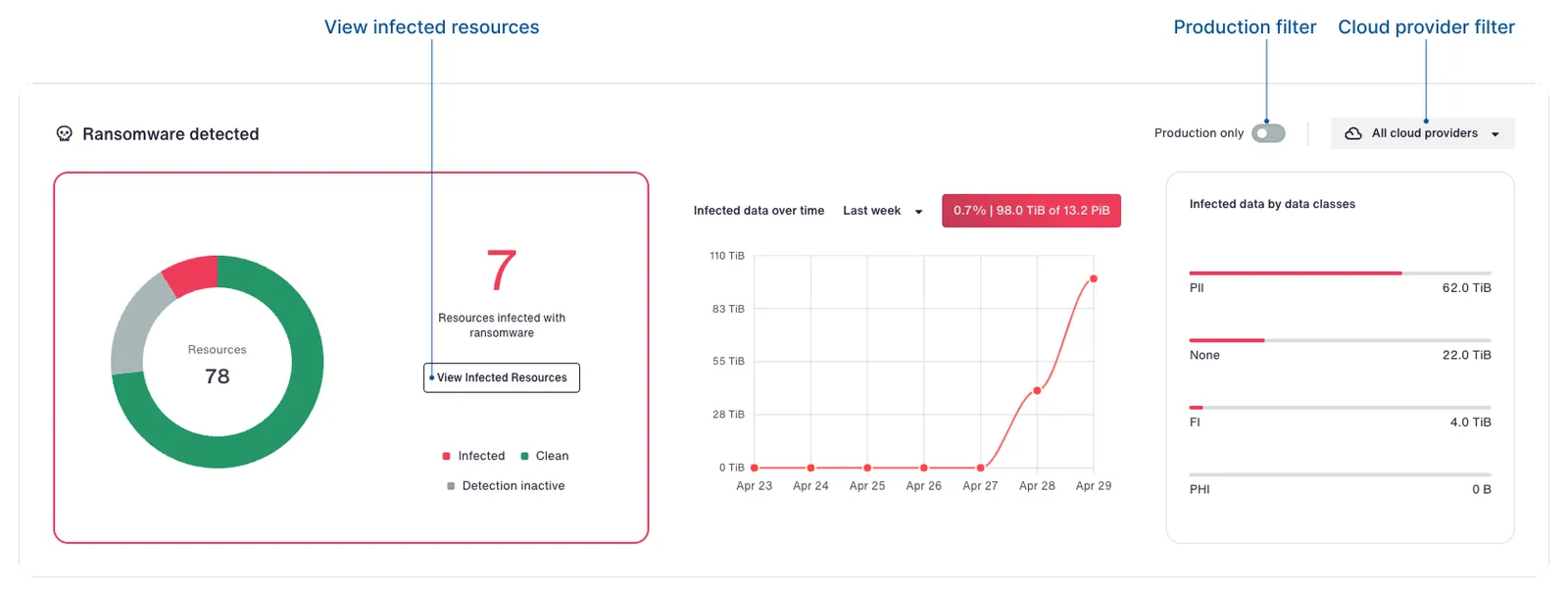
The dashboard displays infected resource counts, infected storage over time, and breakdowns by data class.
From the dashboard, you can:
-
Filter resources by cloud provider or for production resources only.
-
Navigate directly to a filtered inventory view for detailed investigation. You can do this by clicking View Infected Resources.
-
See trends in infected storage over time.
-
Review infection patterns across different data classifications.
In the inventory
In the inventory, infected resources are displayed with red highlighted resource name next to a skull icon. You can filter for infected resources by clicking the Ransomware Detected button, which shows the number of infected resources.
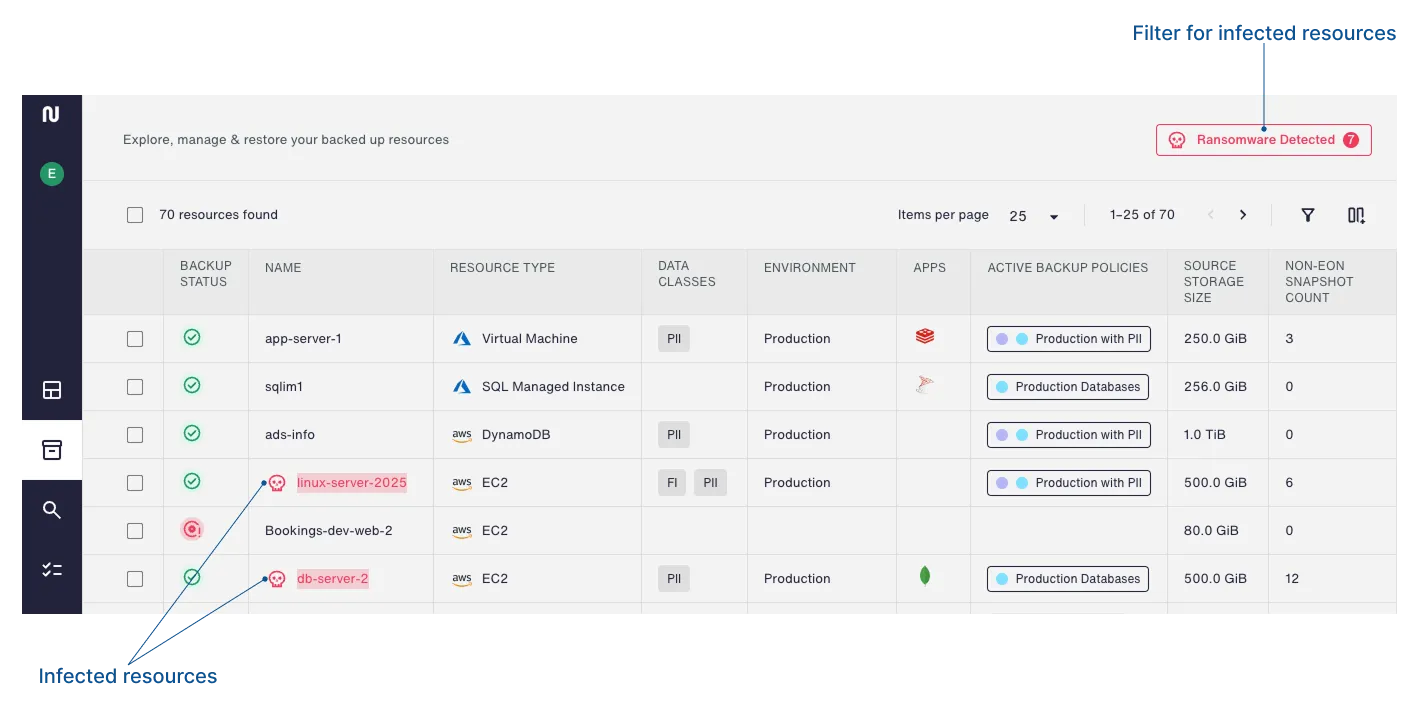
You can dig deeper by clicking a resource name and opening the resource details panel. The resource details gives more information such as dates for the last clean snapshot and last infected snapshot. You can also restore any clean or infected snapshot, just as you can with any other resource.
In the file explorer
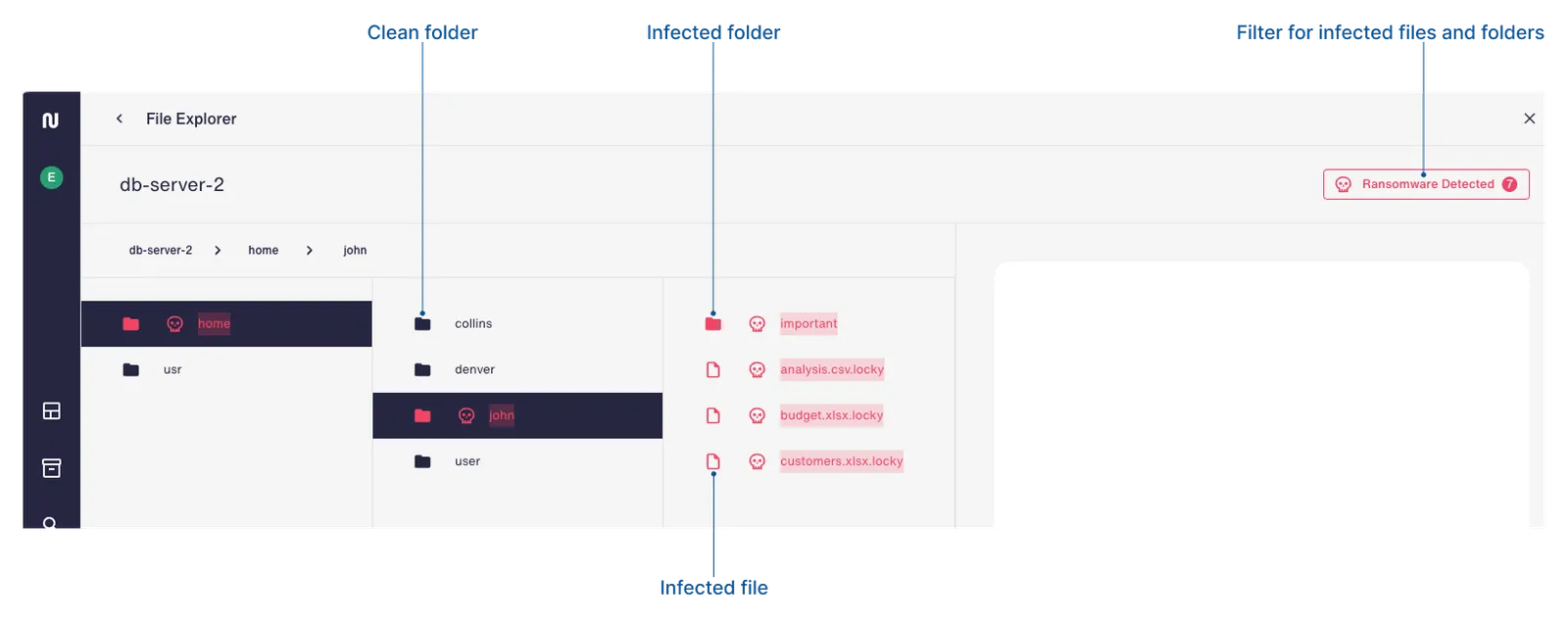
The file explorer enables threat hunting (the investigation of security threats) by providing file-level detail that goes beyond the resource-level view in the dashboard and inventory. It shows infected files across all snapshots in a unified view, meaning files are shown as infected if they were compromised in any currently retained snapshot, even if the current snapshot is clean. This allows security teams to investigate the full scope of an attack and identify which specific files were affected throughout the infection timeline.
You can see ransomware indicators at both the folder and file levels, and restore the latest clean copy of any file.
How Eon handles infected resources
When working with ransomware detection, it’s helpful to understand how ransomware infection status is determined, as well as how Eon handles infected and clean resources.
Infected resources
When Eon finds ransomware indicators on a snapshot, the resource is considered infected. As long as the latest snapshot contains signs of ransomware, the resource continues to be considered infected.
Eon retains the latest clean snapshot indefinitely, even if its retention period expires.
Ransomware detection typically requires a clean baseline snapshot to compare future snapshots against. Even so, Eon attempts to identify ransomware indicators on the first snapshot of a new resource. If ransomware indicators are found, the resource is considered infected from the start.
Clean resources
When the latest snapshot is clean, the resource is considered clean. This is true even if previous snapshots are infected.
Ransomware notifications
Eon provides notifications for ransomware-related events, helping you stay informed about the status of your resources and snapshots. You can enable notifications for these ransomware-related events:
-
Ransomware detected in resource.
-
Ransomware detected in snapshot.
-
Ransomware infection remediated.
-
Resource excluded from ransomware detection.
-
Ransomware detection exclusion canceled for resource.
For more information on notifications, see About Notification Policies.