

About Azure Tenants
This article explains how Azure tenant setup works in Eon and what gets created during the process.
Before you can connect Azure subscriptions to Eon, you must set up your Azure tenant. An Azure tenant in Eon refers to a dedicated instance of Entra tenant in Azure that contains the source and restore subscriptions you want to connect to Eon. Tenant setup is required once per Azure tenant and creates the shared infrastructure Eon uses to access the Eon-connected subscriptions within it. Once a tenant is set up, you can connect as many source and restore subscriptions within that tenant as you need without repeating this step.
The separation between tenant setup and subscription connection means you only need elevated Microsoft Entra ID permissions once, regardless of how many subscriptions you connect later.
What Eon creates during tenant setup
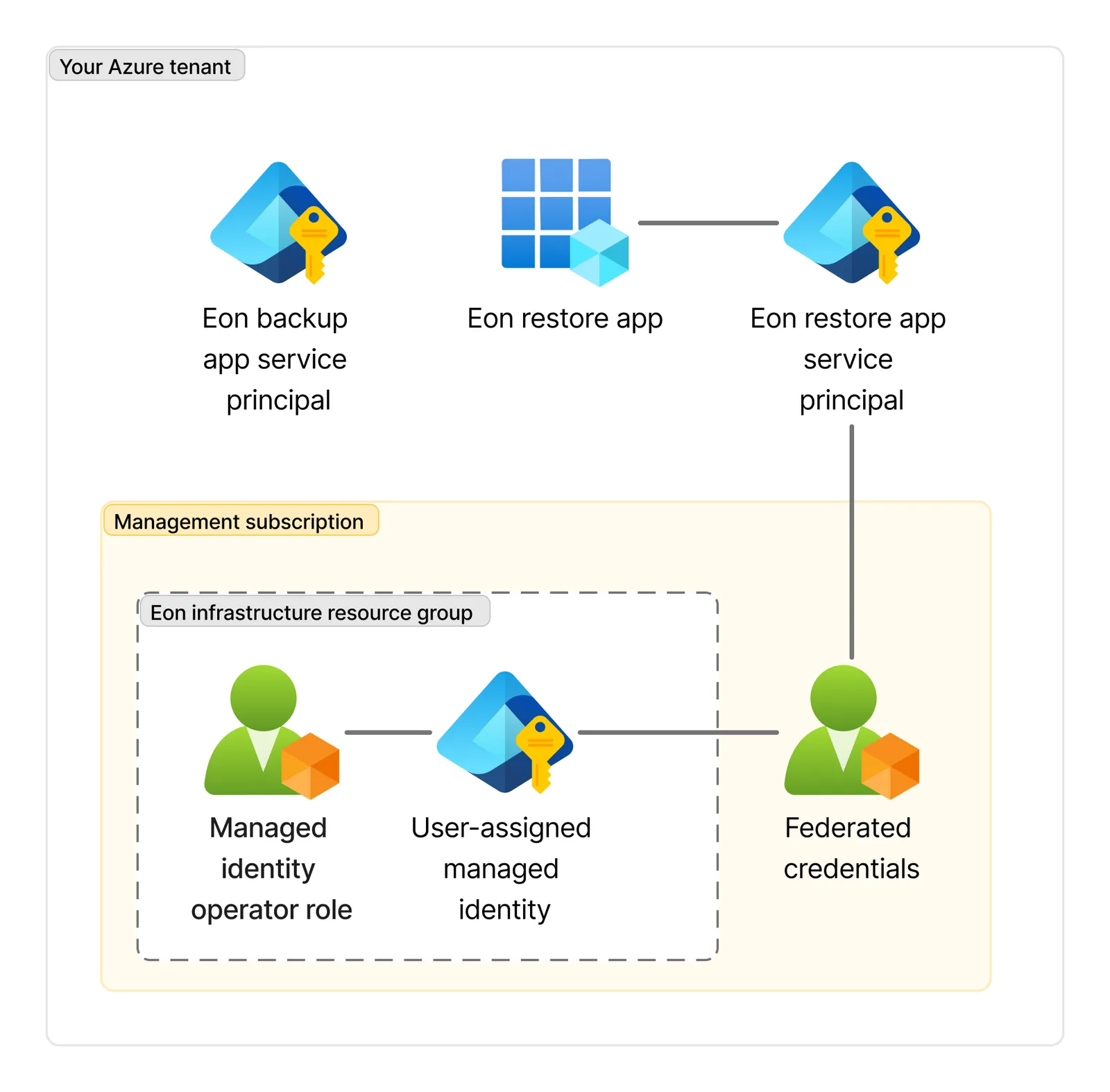
During tenant setup, Eon creates the following components in your Azure environment:
-
Eon restore app registration: An application registered in your Azure tenant. This is created up front so it’s ready when you connect restore subscriptions later.
-
Eon restore app service principal: The service principal in your tenant that represents the restore application. When you connect a restore subscription, Eon assigns roles to this service principal to grant the permissions needed to restore resources in that subscription.
-
Eon backup app service principal: A service principal in your tenant that represents the Eon backup application. The backup application itself is registered in Eon’s own Azure tenant.
-
Eon resource group: A resource group named
eon-tenant-infra-rg, created in your management subscription to hold the shared resources Eon needs to operate across your tenant. -
User-assigned managed identity: A managed identity created inside the Eon resource group.
-
Managed identity operator role: A role assigned to the Eon backup app service principal, granting it permissions to operate the user-assigned managed identity. The Eon backup application is registered in Eon’s Azure tenant, where your discovery, scanning, and backup operations run.
-
Federated credentials: A federation between the managed identity and the restore application, using Azure workload identity federation. This is created upfront alongside the restore app registration. When you restore data, Eon must authenticate as the restore application to access your restore subscription. The federated credentials make this possible using the managed identity, without needing to manage or rotate certificates.
Management subscription
The management subscription is the Azure subscription where Eon creates the Eon resource group and user-assigned managed identity. You provide this subscription ID during tenant setup.
The subscription doesn’t need to be dedicated to Eon, but it should ideally be one you use for third-party service resources rather than workloads you want to back up with Eon.
Azure setup overview
Setting up Eon for Azure involves three steps, each covered by a separate article: