

Work with AI Assistant
Who can use this feature
Anyone with these permissions: Use AI assistant (Cloud workloads, SaaS applications)
The Eon AI Assistant answers questions about your backups, costs, and compliance from your live Eon data, so you don’t have to cross-check several console pages yourself. It can also build a dashboard from a description, and take you from a threat finding to a restore plan that does nothing until you approve it.
This article explains how to ask AI Assistant a question about your Eon data and mention an item from your account in the chat. For what AI Assistant can change in your account and how access control and auditing apply, see About AI Assistant.
Ask AI Assistant a question
-
Click the Ask AI tab.
The AI Assistant chat panel opens.
-
Start a chat.
-
Write your question in plain language, or click a suggested prompt.
To name a resource, vault, policy, or account in your question, type
@in the message box and choose it from the picker. The picker shows only items your own permissions cover.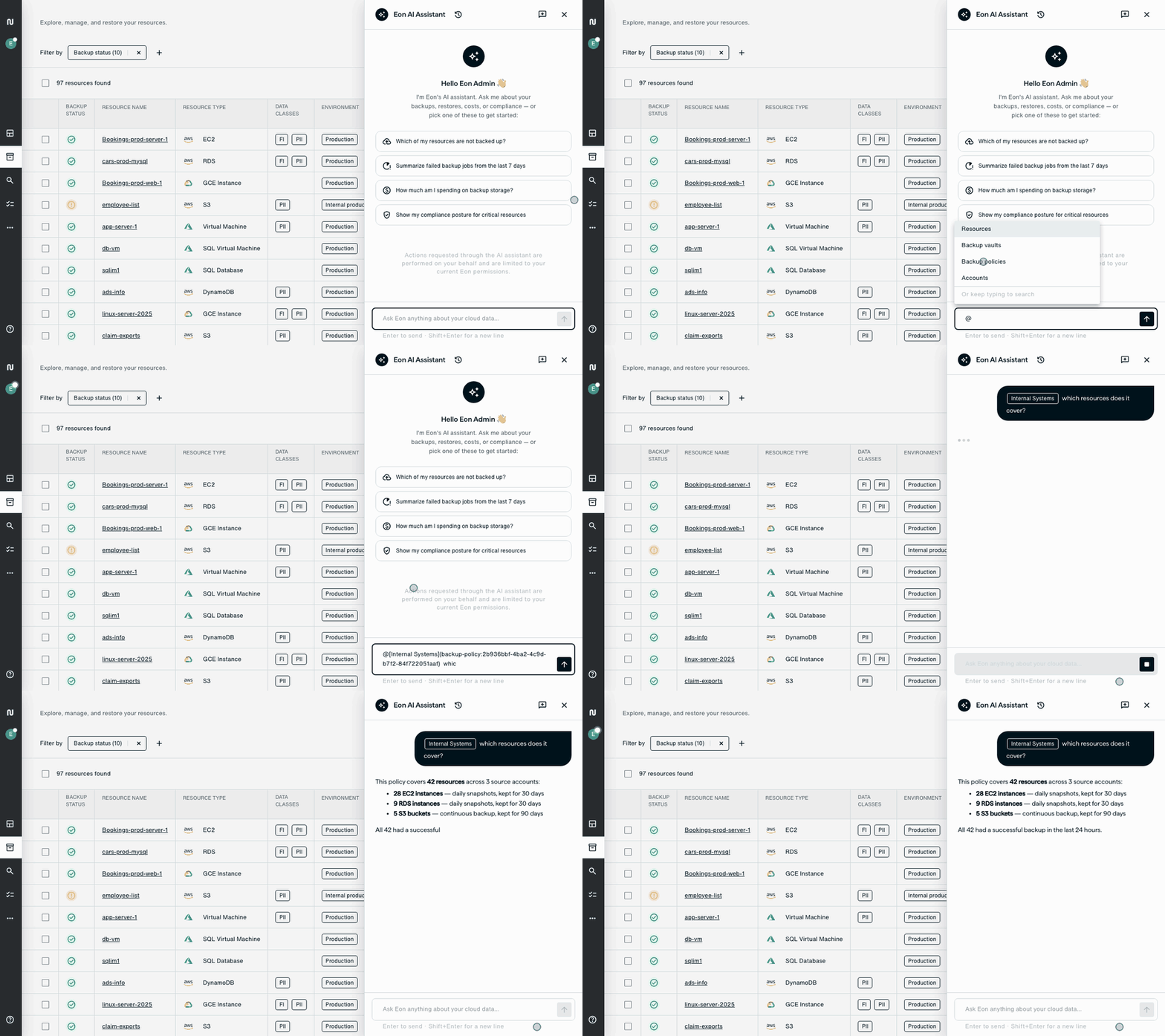
Check the pages listed under Sources before you act on an answer from the Eon docs, as What AI Assistant uses to answer describes.
Return to an earlier chat
To return to an earlier conversation, open Previous chats, then select a chat.
To rename or delete a chat, click its (Actions) menu, then click Rename or Delete. Deleting a chat doesn’t change AI Assistant’s memory.