

AWS: About Eon Sensor
With Eon Sensor, each high-frequency backup of an EC2 instance after the first saves only the blocks that changed since the last backup. Eon saves the changes as an incremental snapshot in your vault, the storage destination where Eon saves your snapshots. Restores and retention use the same vault and policy settings as other EC2 backups.
This article explains what Eon Sensor is, how it works with high-frequency backup, and what it changes on your instance, so you can decide whether to install it.
Eon Sensor is software that you install on a Linux or Windows Server EC2 instance. It tracks which blocks change on the EBS volumes attached to the instance and reports them to Eon. Eon uses the reported changes for the instance’s backups under a high-frequency backup policy.
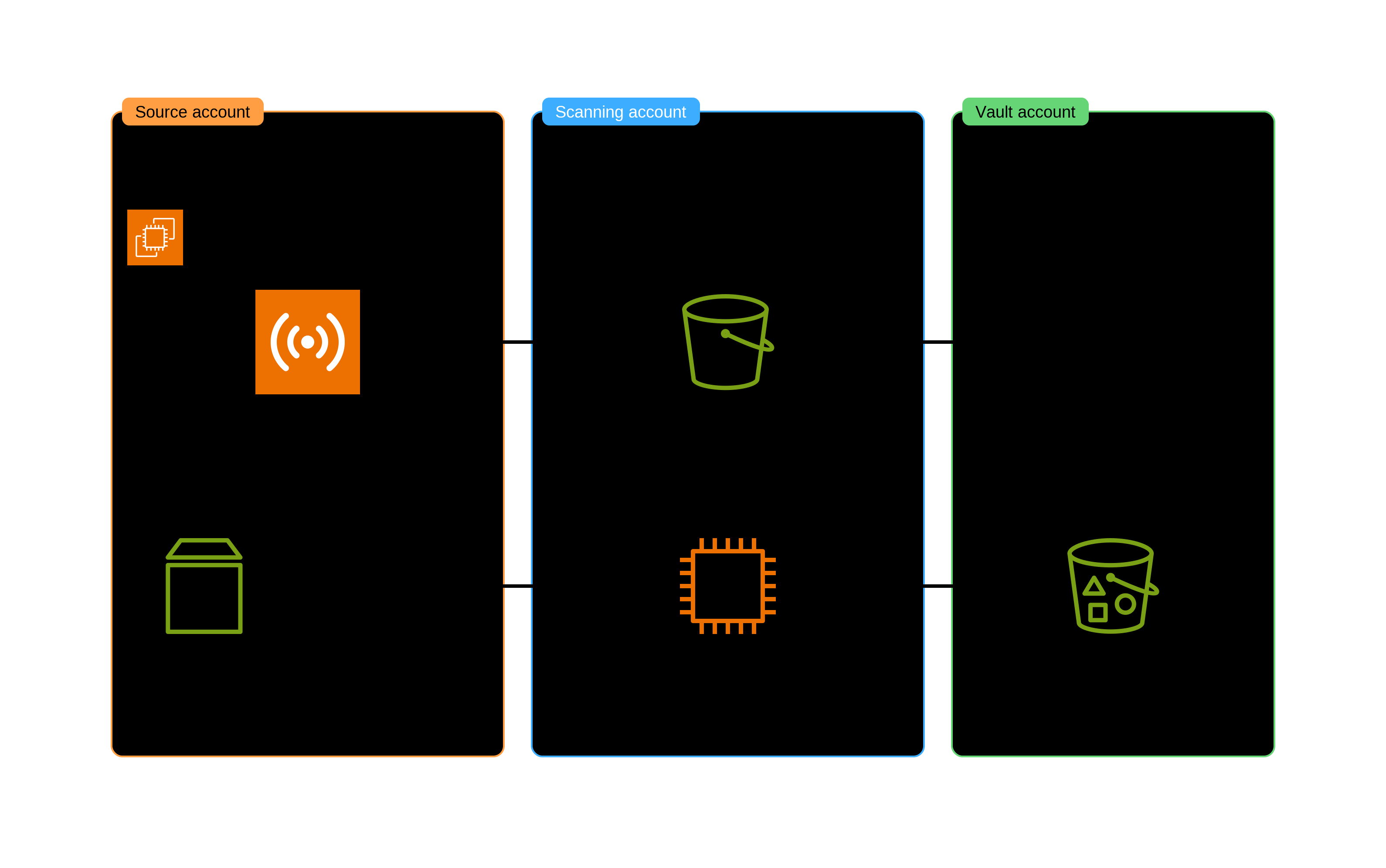
Eon processes your backups in the scanning account. The backup process is shown in this diagram and described below:
-
For the first backup, Eon takes a full baseline backup of the instance’s EBS volumes. A backup server in the scanning account reads the volumes and saves the backup in your vault.
-
While the instance runs, Eon Sensor tracks which blocks change on the EBS volumes attached to it.
-
Eon Sensor uploads the changed blocks to the staging bucket in the scanning account.
-
Eon saves the changes from the staging bucket in your vault as an incremental snapshot.
Eon also takes full baseline backups at other times, as described in Baseline backups.
Enrollment
An instance is enrolled when its EC2 resource is assigned to a high-frequency backup policy. Installing Eon Sensor alone doesn’t enroll the instance.
Eon uses Eon Sensor for an instance’s backups only when both of these are true:
-
The instance is enrolled.
-
Eon Sensor is installed and running on the instance.
You install Eon Sensor yourself on each instance, as described in AWS: Install Eon Sensor on Linux and AWS: Install Eon Sensor on Windows Server. Eon doesn’t install it for you.
Eon enrolls an instance within a few minutes of the assignment.
Changes to your instance
-
Service on Linux: Eon Sensor runs as a
systemdservice, as root. -
Service on Windows Server: Eon Sensor runs as a Windows service, and the service runs as the
LocalSystemaccount. -
Driver on Windows Server: Eon Sensor tracks changes through a disk filter driver,
eonflt, that Windows loads at boot. The first install needs one restart of the instance so that Windows loads the driver. -
Permissions: You attach an Eon-provided managed IAM policy to the instance’s IAM role. The policy grants access to the Eon resources that Eon Sensor uses, and it doesn’t grant access to your own resources. For an instance without an IAM role, you attach an Eon-provided instance profile instead.
-
Identity: Eon Sensor uses the instance’s IAM role as its identity, so it uses no tokens or keys.
-
Connections: All connections are outbound from the instance, and none are inbound. During a backup, Eon Sensor uploads the blocks that changed to the staging bucket in the scanning account through Amazon S3 over these connections. VPC endpoints are supported. For the services the instance must reach, see AWS: Install Eon Sensor on Linux or AWS: Install Eon Sensor on Windows Server.
Baseline backups
Tracking restarts when the instance reboots, when Eon Sensor restarts (including a restart for an upgrade), when you resize a volume, or when Eon Sensor loses track of changes.
After tracking restarts, the next backup is a full baseline backup. Backups after it are incremental snapshots. For the baseline backup, Eon takes an EBS snapshot of each attached volume. Eon Sensor doesn’t take these snapshots.
Additional information
How-to guides:
Related concepts: